Electronics
LAPTOPS
- HP Laptop G50 series, Keyboard Repair
- Sticky keys, keys not working, or missing keys
-
Your HP Laptop has a sticky key, a key that is not working, or a missing key on
the keyboard...these instructions will show you how to go about taking your
laptop apart and replacing the keyboard. It's really not that hard with
the step by step pictures and instructions provided by these instructions.
This particular repair was done on HP Laptop model number: HP G50,
specific Part Number NP534UA#ABA. This one had a key that was not working (the
"F" key wouldn't work).
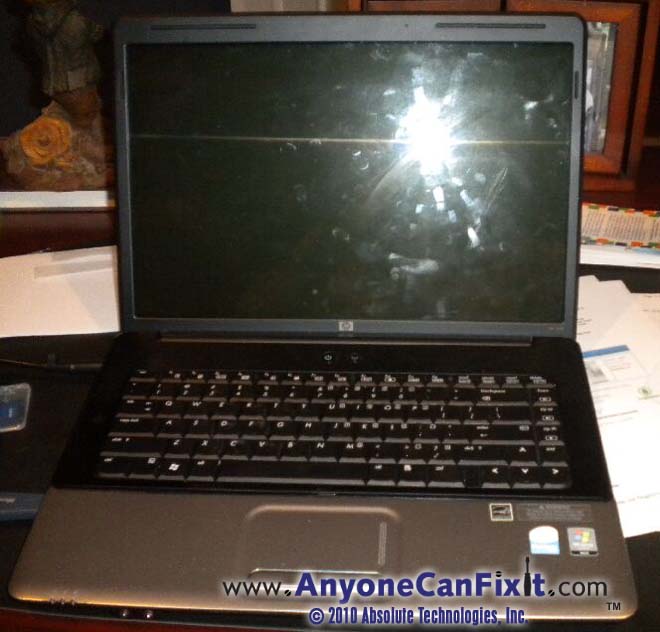
Figure 0.5 - HP G50 Series which Needs a New Keyboard
This repair will require getting a replacement keyboard. I
will show you how to locate and order a replacement keyboard (for about $19) within the
instructions (so no need to worry if you have lost keys on your current
keyboard).
TIME REQUIRED:
About a 30 minute job....add another 30 minutes if you are taking your
time through the process.
Skills Required to Complete:
You will need to be able to use a phillips screwdriver...not a whole lot of
skill needed to complete this repair.
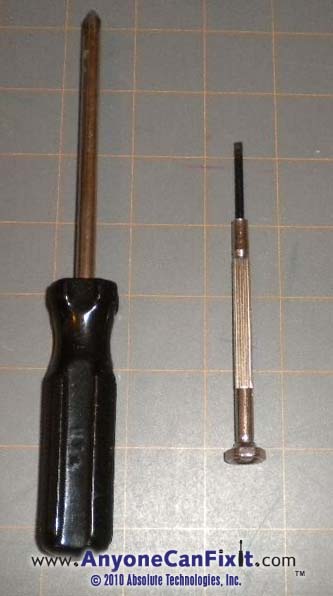
Figure 7.2 - Tools Needed for the HP G50 Series Keyboard Repair
1. Phillips Screwdriver
2. Small Jeweler's Screwdriver
$9.99 for Repair Instructions on
Replacing the HP G50 Series Laptop Keyboard
If these repair instructions don't help you get
your laptop fixed, we'll refund your payment...all instructions money back
guaranteed!
NOTE:
Your login and password will be immediately sent to the email address that is
registered with your PayPal account. If this is not the proper email address
you want the login and password sent to, please send a note with the proper
email address, however, there will be a delay as the email will have to be
manually processed. If you want to avoid any delay, make sure your PayPal
email address is correct.
MAKE SURE YOUR EMAIL IS CURRENT AND CORRECT IN
PAYPAL TO AVOID DELAY ON DELIVERY OF YOUR LOGIN AND PASSWORD.
If you realize that it was not current when you
confirmed your PayPal contribution, please send me an
email (dharrison@AnyoneCanFixIt.com)
NOTE: Microsoft's Outlook
Express is sometimes set not to allow viewing of attachments due to security
issues (this may have been set automatically without your knowledge by
Microsoft). If you are unable to read the attachment that is automatically
sent to you once you donate via PayPal (or you do not see an email reply
within 10 minutes), try this: In Outlook Express click Tools, Options,
Security and uncheck the box by "Do not allow attachments to be saved or
opened that could potentially be a virus". You may re-enable this once you
have the chance to get your login and password from the email attachment that
is sent.
If you have a yahoo.com email address, make sure to check your spam
folder...seems like yahoo.com likes to stick my emails in there.
Or, if you don't use PayPal,
then your payment can be sent to:
Absolute Technologies, Inc.
Attention: HP G50 Series Laptop Keyboard Repair
PO Box 601
Holly Springs, NC 27540
Please include your email address
so that your access can be emailed to you.
Television
- Sony HDTV LCD projection television - picture color is off-color and/or the picture will come on for a
few seconds, then shuts off for about 40 seconds while flashing the green Power / Standby
on and off, then come back on for a few seconds, repeating the entire cycle
over and over.
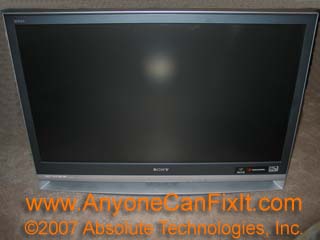
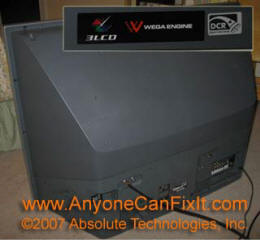
Figure 1 - Sony HDTV that keeps shutting
down or has no picture.
Do you have one of these nice Sony Wega LCD
projection HDTV in which the color is no longer true and/or the picture just
won't come on, or the picture will come on for about 10 seconds then shut off while keeping the Power/Standby light blinking green for about
40 seconds, then the television will come back on for about 10 seconds before
cycling again to off. You will sometimes see the television start to act
this way after a power outage. This particular Sony model is the KDF
E42A10. Other Sony HDTV LCD models would apply if you are experiencing these same
conditions. We have the fix for this, along with tips to keep it from
happening again.
Along with the $19.99 instructions, you will need a part
that costs $175. I offer the sale of this part within the instructions
for $175 new. You will find this part available at other places on the
internet for $199 or more. I believe I offer the lowest price by keeping
my overhead low. You may also be able to find the part locally at a
television repair shop, however, I would bet that it will be at or above the
$199 cost (but if you are in a hurry, this may be an option rather than wait
for the shipping). No other tools are needed for this repair other than
the part.
I have seen this repair quoted at $2000 by a local
television repair facility!!! A new television costs less than that!
Save yourself the trouble of transporting your television to your local repair
facility or being charged a large amount for an in-home visit by a television
repair technician (minimum charge just for the visit is typically $80).
$19.99 for Repair Instructions on
the Sony LCD HDTV Issue
NOTE:
Your login and password will be immediately sent to the email address that is
registered with your PayPal account. If this is not the proper email address
you want the login and password sent to, please send a note with the proper
email address, however, there will be a delay as the email will have to be
manually processed. If you want to avoid any delay, make sure your PayPal
email address is correct.
MAKE SURE YOUR EMAIL IS CURRENT AND CORRECT IN
PAYPAL TO AVOID DELAY ON DELIVERY OF YOUR LOGIN AND PASSWORD.
If you realize that it was not current when you
confirmed your PayPal contribution, please send me an
email (dharrison@AnyoneCanFixIt.com)
NOTE: Microsoft's Outlook
Express is sometimes set not to allow viewing of attachments due to security
issues (this may have been set automatically without your knowledge by
Microsoft). If you are unable to read the attachment that is automatically
sent to you once you donate via PayPal (or you do not see an email reply
within 10 minutes), try this: In Outlook Express click Tools, Options,
Security and uncheck the box by "Do not allow attachments to be saved or
opened that could potentially be a virus". You may re-enable this once you
have the chance to get your login and password from the email attachment that
is sent.
If you have a yahoo.com email address, make sure to check your spam
folder...seems like yahoo.com likes to stick my emails in there.
Or, if you don't use PayPal,
then your payment can be sent to:
Absolute Technologies, Inc.
Attention: Sony HDTV Repair
PO Box 601
Holly Springs, NC 27540
Please include your email address
so that your access can be emailed to you.
Maxtor OneTouch 4 500GB External Hard Drive Repair
and Data Recovery
If you purchased a Maxtor OneTouch 4 500GB External hard
drive, you will likely experience its failure within a year of it's purchase.
While the drive is under warranty, the problem with sending it off for repairs,
you will lose the data that is stored on the drive unless you pay you pay a data
recovery fee to Seagate (Seagate is the company the sells these drives and
warranties them) which typically runs beyond $1000!
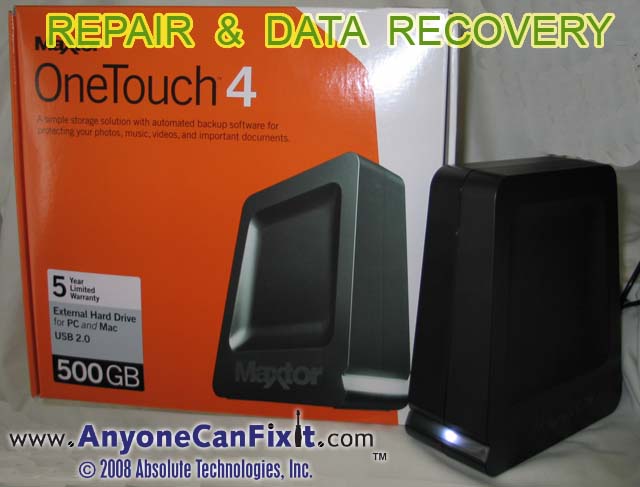
Figure 1.2 - Maxtor OneTouch 4 500GB External Hard Drive
We are currently repairing these drives, including
the data recovery, for $179.99. If the problem with your
drive is that white light (LED) on the front panel has gone blank and your
computer can no longer read or write to and from it (your computer will not be
able to see the hard drive at all), then this repair is for you. Note,
if you have dropped or had a hard shock to your drive while it was operating,
this repair is NOT for you (we are unable to repair a drive that has been
damaged from a fall or hard shock).
You do not have to loose all your data (those precious
digital photos or digital movies) on the external hard drive or pay some extreme
price to recover your data. For $179.99 your drive will be restored along
with the data on it. Typically the unit will be repaired and shipped back
within 48 hours of receipt. Return shipping is included in the price.
Again, this repair is for those units that appear to have
died and is not operating...the computer does not recognize the external
hard drive when it is properly connected.
If for some reason we are unable to repair your drive, we
will ship it back to you at no charge.
You can pay for your repair with PayPal or any major credit card once we contact you that the repair is completed (or
you may include a check with your hard drive shipment). :
Absolute Technologies, Inc.
Attention: Maxtor OneTouch Repair
PO Box 601
Holly Springs, NC 27540
Please include your email address
so that we may promptly contact you regarding the status of your repair.
If you are interested in this service or if you have any
other questions, please contact us at
dharrision@anyonecanfixit.com.
$179.99 Repair of Maxtor OneTouch 4 External Hard Drive Repair Payment
Bose Lifestyle Media Center
- Sound cuts off after playing for a while.
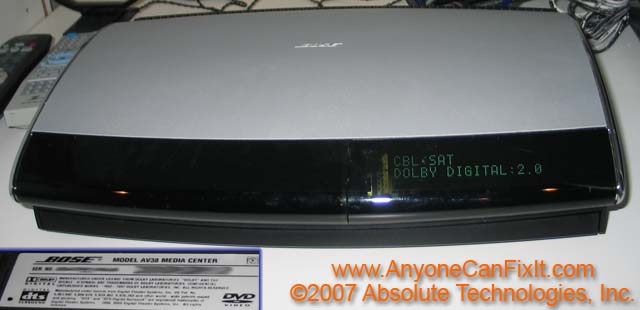
Figure 1.3 - Bose Lifestyle Media Center (Model AV38 shown
above)
There is an issue with this Bose Lifestyle Media Center
AV38 in which the sound cuts off (no sound out of the speakers) after
playing for a while. The sound will usually come back on after the unit
has been turned off and allowed to cool. We have a repair for this Bose
Lifestyle Media Center problem. This repair may also apply to other Bose Lifestyle
systems that are configured like the one shown in Figure 1.3 above (for example
models AV28, AV38 and AV48....series 28, series 38, and series 48).
The basic repair requires the following supplies and
tools shown in Figure 1.35 below.
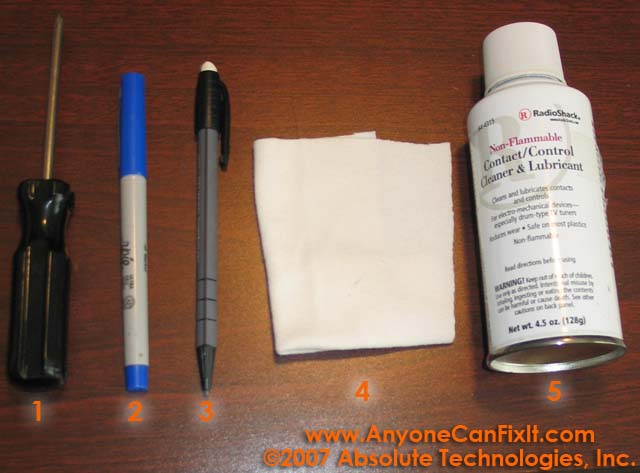
Figure 1.35 - Supplies Needed for the Bose Lifestyle
Repair
1. Phillips Screwdriver
2. Marking pen (optional)
3. Eraser (Pencil shown with an eraser on the end).
4. Wipe Cloth
5. Contact / Control Cleaner & Lubricant (Radio Shack
#64-4315 ...about $10.00/can)
To purchase your access to the Bose Lifestyle Sound Issue
repair instructions, use one of the icons below. These repairs are
guaranteed or your money back.
$19.99 for Repair Instructions on
the Bose Lifestyle Sound Issue
NOTE:
Your login and password will be immediately sent to the email address that is
registered with your PayPal account. If this is not the proper email address
you want the login and password sent to, please send a note with the proper
email address, however, there will be a delay as the email will have to be
manually processed. If you want to avoid any delay, make sure your PayPal
email address is correct.
MAKE SURE YOUR EMAIL IS CURRENT AND CORRECT IN
PAYPAL TO AVOID DELAY ON DELIVERY OF YOUR LOGIN AND PASSWORD.
If you realize that it was not current when you
confirmed your PayPal contribution, please send me an
email (dharrison@AnyoneCanFixIt.com)
NOTE: Microsoft's Outlook
Express is sometimes set not to allow viewing of attachments due to security
issues (this may have been set automatically without your knowledge by
Microsoft). If you are unable to read the attachment that is automatically
sent to you once you donate via PayPal (or you do not see an email reply
within 10 minutes), try this: In Outlook Express click Tools, Options,
Security and uncheck the box by "Do not allow attachments to be saved or
opened that could potentially be a virus". You may re-enable this once you
have the chance to get your login and password from the email attachment that
is sent.
If you have a yahoo.com email address, make sure to check your spam
folder...seems like yahoo.com likes to stick my emails in there.
Or, if you don't use PayPal,
then your payment can be sent to:
Absolute Technologies, Inc.
Attention: Bose Lifestyle Repair
PO Box 601
Holly Springs, NC 27540
Please include your email address
so that your access can be emailed to you.
Bose Lifestyle 20
Series Music System Repair - CD Magazine Won't Eject or CDs Won't Play
-
Your Bose Lifestyle 20 CD magazine will not eject and you just hear a buzzing
noise as the CD magazine tries to eject or you are unable to play CDs that are
in the unit.
This repair should be compatible with other Bose Lifestyle
Series Music System units that have this same look and body style, if in doubt,
just email
dharrison@AnyoneCanFixIt.com
and inquire about your specific unit.
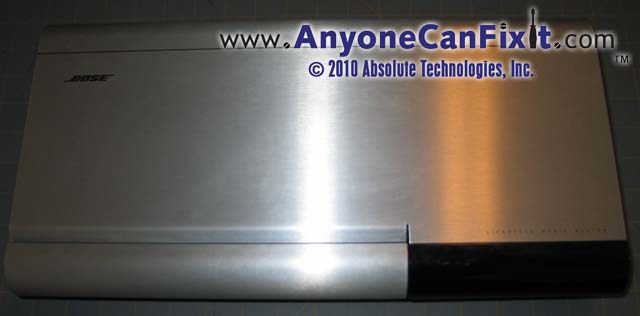
Figure 1.4 - Bose Lifestyle 20 Series Music System
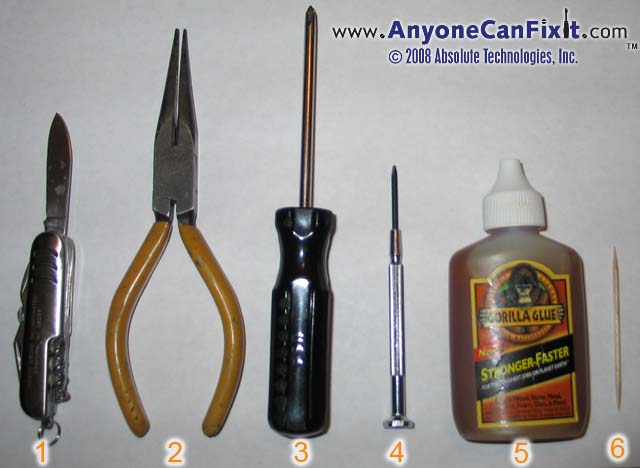
Figure 1.45 - Supplies Needed for the Bose Lifestyle
20 Series Music System CD Repair
1. Knife (or some sort of flat blade)
2. Needle Nose Pliers
3. Phillips screwdriver
4. Small Jeweler's screwdriver
5. Gorilla Glue (or similar...maybe super glue).
6. Toothpick (or some sort of stick)
This is a relatively easy fix that anyone would be able to
perform. With all the supplies together, it should take you about 20
minutes to complete.
$19.99 for Repair Instructions on
the Bose Lifestyle 20 Music System with CD Magazine and Eject Issues
If these repair instructions don't help you get
your Bose unit fixed, we'll refund your payment...all instructions money back
guaranteed!
NOTE:
Your login and password will be immediately sent to the email address that is
registered with your PayPal account. If this is not the proper email address
you want the login and password sent to, please send a note with the proper
email address, however, there will be a delay as the email will have to be
manually processed. If you want to avoid any delay, make sure your PayPal
email address is correct.
MAKE SURE YOUR EMAIL IS CURRENT AND CORRECT IN
PAYPAL TO AVOID DELAY ON DELIVERY OF YOUR LOGIN AND PASSWORD.
If you realize that it was not current when you
confirmed your PayPal contribution, please send me an
email (dharrison@AnyoneCanFixIt.com)
NOTE: Microsoft's Outlook
Express is sometimes set not to allow viewing of attachments due to security
issues (this may have been set automatically without your knowledge by
Microsoft). If you are unable to read the attachment that is automatically
sent to you once you donate via PayPal (or you do not see an email reply
within 10 minutes), try this: In Outlook Express click Tools, Options,
Security and uncheck the box by "Do not allow attachments to be saved or
opened that could potentially be a virus". You may re-enable this once you
have the chance to get your login and password from the email attachment that
is sent.
If you have a yahoo.com email address, make sure to check your spam
folder...seems like yahoo.com likes to stick my emails in there.
Or, if you don't use PayPal,
then your payment can be sent to:
Absolute Technologies, Inc.
Attention: Bose Lifestyle 20 Series CD Repair
PO Box 601
Holly Springs, NC 27540
Please include your email address
so that your access can be emailed to you.
If you are having the problem with your Bose
Lifestyle 20 Series Music System not having the display light up, drop me a line
at
dharrison@AnyoneCanFixIt.com
...I may have a fix for you that has not been documented at this time (but will
be once I see a big enough demand for it).
What People Are Saying about this Repair...
Dear Anyone Can Fix It,
Can't thank you enough for your help in solving my problem for my Bose Lifestyle
Model 20. Not only that I saved a lot of money, It gives me a great pleasure of
listening to my favorites music thru my Bose Lifestyle Stereo.
Your simple and precise instructions of how to fix it made it easier for myself
to solved the problem. It made me feel good that I have done something that I
never expected in my whole life.
Thank you again and I wish you the best for your future endeavor. Nice doing
business with you.
Sincere yours,
Jo-Ann B. Pajarillaga - jo.pajarillaga@NOSPAMyahoo.com (remove NOSPAM for a valid
email address)
Elizabeth, NJ
Another satisfied customer...
Duane,
The money paid to fix the Bose was well worth it. Bose wanted $300 to fix it.
I just finished fixing the Bose system for my friend. He and his wife were so
pleased. The fix worked perfectly. Thanks so much.
John Crawford - Saginaw, Michigan
pelikan2@NOSPAMchartermi.net (remove NOSPAM for valid email
address)
Bose Lifestyle 20
Series Music System DISPLAY Repair - Display is off, blank, out, or just
very dim.
-
Your Bose Lifestyle 20 Music System display is blank, off and/or very dim.
This repair should be compatible with other Bose Lifestyle
Series Music System units that have this same look and body style, if in doubt,
just email
dharrison@AnyoneCanFixIt.com
and inquire about your specific unit.
Figure 1.4 - Bose Lifestyle 20 Series Music System - Display Repair
TIME REQUIRED:
About a 45 minute job....add another 45 minutes if you are taking your
time through the process.
Skills Required to Complete:
You will need to do some unsoldering/soldering of some
components...soldering skills recommended or learn them as you do this
repair...we'll show you how to do it in the instructions.
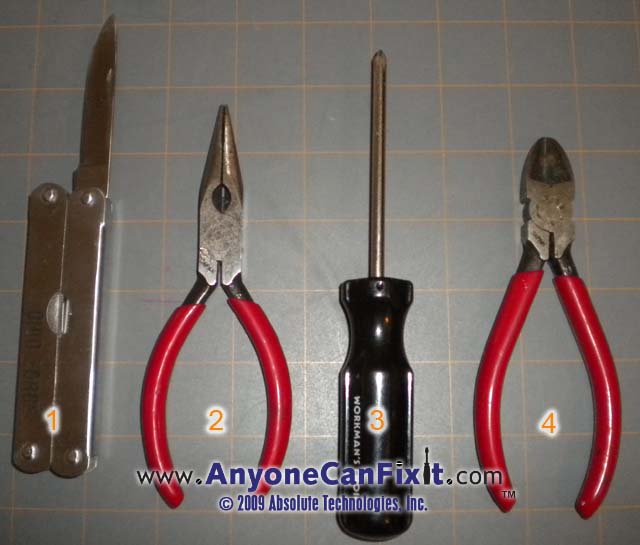
Figure 7.2 - Tools Needed for the Bose Lifestyle
20 Series Display Repair
1. Knife (or some sort of flat blade)
2. Needle Nose Pliers
3. Phillips Screwdriver
4. Small Wire Cutter
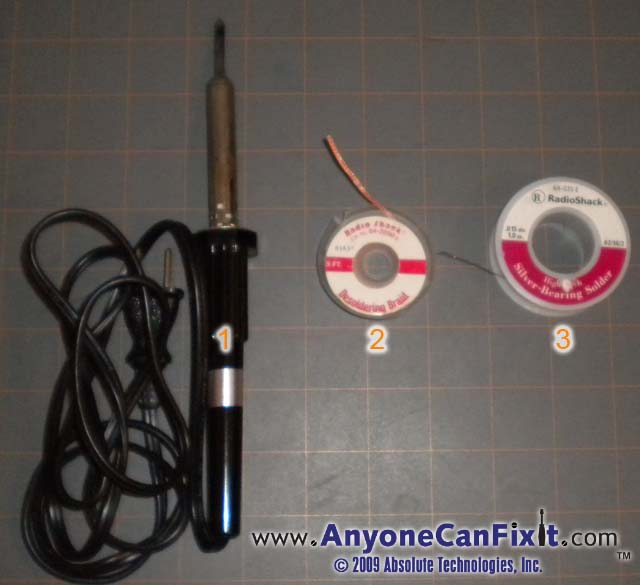
Figure 7.3 - More Tools and Supplies Needed for the Bose Lifestyle
20 Series Display Repair
1. Solder Iron (Needle nosed works best...Radio Shack has
a 25W - Model: 64-2070, Catalog #: 64-2070 for about $9 that will work)
2.
Desolder Braid (Radio Shack Model: 64-2090, Catalog #: 64-2090 for about $4)
3. Solder (Hi Tech Silver Bearing Solder works good...Radio Shack Model: 64-035,
Catalog #: 64-035 for about $6 )
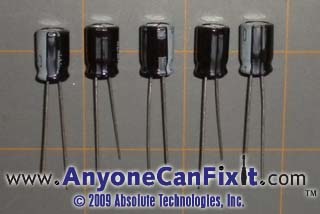
Figure 7.4 - Parts Needed for the Bose Lifestyle
20 Series Display Repair
1. Capacitors which can be bought at Radio Shack for a
total of about $7.50
$19.99 for Repair Instructions on
the Bose Lifestyle 20 Music System with NO DISPLAY or a DIM DISPLAY
If these repair instructions don't help you get
your Bose unit fixed, we'll refund your payment...all instructions money back
guaranteed!
NOTE:
Your login and password will be immediately sent to the email address that is
registered with your PayPal account. If this is not the proper email address
you want the login and password sent to, please send a note with the proper
email address, however, there will be a delay as the email will have to be
manually processed. If you want to avoid any delay, make sure your PayPal
email address is correct.
MAKE SURE YOUR EMAIL IS CURRENT AND CORRECT IN
PAYPAL TO AVOID DELAY ON DELIVERY OF YOUR LOGIN AND PASSWORD.
If you realize that it was not current when you
confirmed your PayPal contribution, please send me an
email (dharrison@AnyoneCanFixIt.com)
NOTE: Microsoft's Outlook
Express is sometimes set not to allow viewing of attachments due to security
issues (this may have been set automatically without your knowledge by
Microsoft). If you are unable to read the attachment that is automatically
sent to you once you donate via PayPal (or you do not see an email reply
within 10 minutes), try this: In Outlook Express click Tools, Options,
Security and uncheck the box by "Do not allow attachments to be saved or
opened that could potentially be a virus". You may re-enable this once you
have the chance to get your login and password from the email attachment that
is sent.
If you have a yahoo.com email address, make sure to check your spam
folder...seems like yahoo.com likes to stick my emails in there.
Or, if you don't use PayPal,
then your payment can be sent to:
Absolute Technologies, Inc.
Attention: Bose Lifestyle 20 Series DISPLAY REPAIR
PO Box 601
Holly Springs, NC 27540
Please include your email address
so that your access can be emailed to you.
Television
- Picture is dark even after adjusting the brightness
to its highest/brightest point.
If you are having this problem with your
television, then we have a fix for you (it's actually the same fix as the CRT
computer monitor below). The only tools required are a standard screwdriver and/or
a phillips screw driver (preferably with a rubber, non-conductive handle).
This repair is relatively simple (no soldering required) and at most a screw
driver and phillips screwdriver is required. You'll probably find that
getting the television out of its current location and to an area to work on
it will be the hardest part of the task.
These directions should be applicable to many brands and
models of televisions, not just the example one shown below.
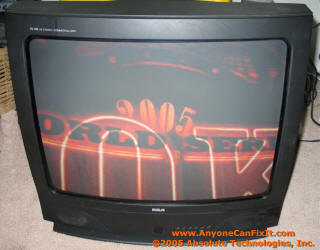
Figure 8 - RCA Television Model F25281
(made by Thomson Consumer Electronics)
To get these repair instructions, submit $4.99 via
PayPal using the icon below and you'll get a unique username and password to
access these instructions.
$4.99 for these Repair Instructions on
the Television Brightness Issue
NOTE:
Your login and password will be immediately sent to the email address that is
registered with your PayPal account. If this is not the proper email address
you want the login and password sent to, please send a note with the proper
email address, however, there will be a delay as the email will have to be
manually processed. If you want to avoid any delay, make sure your PayPal
email address is correct.
MAKE SURE YOUR EMAIL IS CURRENT AND CORRECT IN
PAYPAL TO AVOID DELAY ON DELIVERY OF YOUR LOGIN AND PASSWORD.
If you realize that it was not current when you
confirmed your PayPal contribution, please send me an
email (dharrison@AnyoneCanFixIt.com)
NOTE: Microsoft's Outlook
Express is sometimes set not to allow viewing of attachments due to security
issues (this may have been set automatically without your knowledge by
Microsoft). If you are unable to read the attachment that is automatically
sent to you once you donate via PayPal (or you do not see an email reply
within 10 minutes), try this: In Outlook Express click Tools, Options,
Security and uncheck the box by "Do not allow attachments to be saved or
opened that could potentially be a virus". You may re-enable this once you
have the chance to get your login and password from the email attachment that
is sent.
If you have a yahoo.com email address, make sure to check your spam
folder...seems like yahoo.com likes to stick my emails in there.
Or, if you don't use PayPal,
then you may mail your payment to:
Absolute Technologies, Inc.
Attention: Bright TV
PO Box 601
Holly Springs, NC 27540
Please include your email address
so that your access can be emailed to you.
What
People Are Saying About This Repair...
I want to thank you a
whole lot. I purchased your TV Brightness Fix for $4.99 and you saved my TV! I
have a 13 year old Zenith and the screen had gone blue and looked really
really dark. Your instructions plus a little time and help from my fiancée
fixed it in just a few hours. I am really pleased with your instructions and
will recommend you site to others who have problems, if you have a fix for it
lol.
Alan - alan.sloat@NOSPAMgmail.com (remove NOSPAM
for valid email address)
CRT Computer Monitor
- Display is dark even after adjusting
the brightness to its highest/brightest point.
If you are having this problem with your
CRT computer monitor, then we have a fix for you (it's actually the same fix
as the television above). The only tools required are a standard screwdriver and/or
a phillips screw driver (preferably with a rubber, non-conductive handle).
This repair is relatively simple (no soldering required) and at most a screw
driver and phillips screwdriver is required. You'll probably find that
getting the monitor out of its current location and to an area to work on it
will be the hardest part of the task.
These directions should be applicable to many brands
and models of CRT monitors, not just the example one shown below. For
example, I know these instructions will work for brightening a Viewsonic E90
monitor.
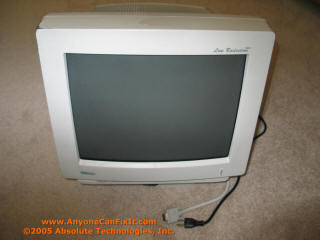
Figure 9 - CRT Computer Monitor
(MaxTech Model XT-7800)
To get these repair instructions, submit $4.99 via
PayPal using the icon below and you'll get a unique username and password to
access these instructions.
$4.99 for these Repair Instructions on
the Television Brightness Issue
NOTE:
Your login and password will be immediately sent to the email address that is
registered with your PayPal account. If this is not the proper email address
you want the login and password sent to, please send a note with the proper
email address, however, there will be a delay as the email will have to be
manually processed. If you want to avoid any delay, make sure your PayPal
email address is correct.
MAKE SURE YOUR EMAIL IS CURRENT AND CORRECT IN
PAYPAL TO AVOID DELAY ON DELIVERY OF YOUR LOGIN AND PASSWORD.
If you realize that it was not current when you
confirmed your PayPal contribution, please send me an
email (dharrison@AnyoneCanFixIt.com)
NOTE: Microsoft's Outlook
Express is sometimes set not to allow viewing of attachments due to security
issues (this may have been set automatically without your knowledge by
Microsoft). If you are unable to read the attachment that is automatically
sent to you once you donate via PayPal (or you do not see an email reply
within 10 minutes), try this: In Outlook Express click Tools, Options,
Security and uncheck the box by "Do not allow attachments to be saved or
opened that could potentially be a virus". You may re-enable this once you
have the chance to get your login and password from the email attachment that
is sent.
If you have a yahoo.com email address, make sure to check your spam
folder...seems like yahoo.com likes to stick my emails in there.
Or, if you don't use PayPal,
then your payment can be sent to:
Absolute Technologies, Inc.
Attention: Bright TV
PO Box 601
Holly Springs, NC 27540
Please include your email address
so that your access can be emailed to you.
 TM
TM